Spring Medley: A Fresh Take on Playful Typography
When a design calls for a burst of color and personality, standard black-and-white typefaces often fall short. This is where Spring Medley, a full-color SVG font, steps in to transform a simple layout into a vibrant celebration. It isn’t just a typeface; it is a complete design asset that brings the cheerfulness of the season directly onto your canvas. For designers, crafters, and small business owners looking to break away from monotone text, this font offers an immediate visual lift without requiring complex graphic design skills.
Visual Style and Character
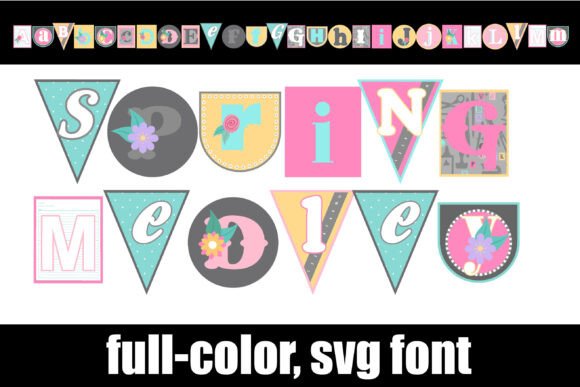
At its core, Spring Medley is defined by its bunting-inspired aesthetic. Each letter is crafted to look like a pennant flag, utilizing a mix of font styles—some bold, some textured, and others script-like—to create a dynamic, celebratory look. The color palette is strictly seasonal, featuring soft pastels, fresh greens, and sky blues typical of spring. However, the true versatility lies in the included alternate glyphs. By accessing your system’s character map or the Silhouette glyph panel, you can switch the colors of individual letters. This allows you to create patterns, alternate hues, or match specific brand colors more closely.
Furthermore, the font includes thematic symbols. Typing the greater than (>) and less than (<) keys unlocks charming bunny and chick illustrations. These vector-based graphics integrate seamlessly with the text, making Spring Medley a comprehensive solution for Easter cards, baby showers, or general springtime marketing. Because it is an OpenType SVG (Scalable Vector Graphics) font, the high-resolution detail is preserved regardless of how large you scale the text.
Practical Applications for Creators
The utility of a premium font like this extends across various industries. For packaging design, particularly for seasonal products like confectionery, cosmetics, or boutique gift wrapping, the bunting style immediately signals a festive, high-quality product. In editorial design, it serves as a striking headline font for magazines or blogs covering spring fashion, garden parties, or wedding planning.
For those in digital marketing, Spring Medley is a powerful tool for social media graphics. Instagram stories, Pinterest pins, and Facebook banners often rely on thumb-stopping visuals. A full-color display font cuts through the noise of a crowded feed far more effectively than standard sans serif fonts. Entrepreneurs can also leverage this typeface for logo design, specifically for sub-brands, seasonal sales events, or pop-up shops where a playful, approachable brand identity is required.
- Crafting and DIY: Ideal for vinyl decals, greeting cards, and scrapbooking.
- Web Design: Perfect for hero banners or seasonal landing pages to grab attention immediately.
- Commercial Use: It functions as a commercial font, allowing small business owners to use it on merchandise for sale.
Technical Integration and Compatibility
Installing Spring Medley is straightforward, but understanding how SVG fonts work is crucial for a smooth workflow. Unlike standard font files, color fonts contain embedded SVG data. You install the .otf file just like any other typeface—via FontBook on a Mac or the Control Panel on Windows.
However, you will notice a specific behavior: in the font preview window of most programs, Spring Medley will likely appear as a solid black silhouette. This is normal. You will only see the full-color vector design once you type the text onto your active canvas. It is vital to ensure your software supports OpenType SVG. Major players like Adobe Photoshop, Illustrator, Silhouette Studio, Quark, and Inkscape currently support this technology. If you use a program that does not support color fonts, the text will simply render as a black outline or solid shape, ensuring your design remains readable even if the color effect is lost.
Design Strategy and Pairing
When integrating Spring Medley into a layout, balance is key. Because it is a highly decorative and colorful display font, it dominates the visual hierarchy. It should rarely be used for body copy. Instead, pair it with a clean, legible typeface for supporting text. A geometric sans serif font or a classic serif font works best to ground the whimsy of the bunting style.
For example, if you are designing a flyer for a community egg hunt, use Spring Medley for the headline "Egg Hunt" to establish the theme. Then, use a font like Montserrat or Garamond for the date, time, and location details. This contrast ensures that the design feels professional and organized rather than chaotic. When evaluating the fit for your project, consider the tone. If your brand voice is strictly corporate or minimalist, this creative font might be too playful. However, for brands aiming for a friendly, artisanal, or youthful vibe, it is an invaluable addition to your typography toolkit.
Maximizing the Glyphs
To get the most out of Spring Medley, take time to explore the alternate characters. By swapping the default colors for the alternate versions included in the font file, you can prevent visual repetition in longer words. This feature is particularly useful in web design and print layouts where you want the word "Spring" to have six different colored letters, creating a rainbow effect without manually separating the text into layers. This level of detail elevates a project from "homemade" to "professionally designed," adding significant value to your digital and physical assets.