Toolbox: The Bold, Industrial Font for Impactful Designs
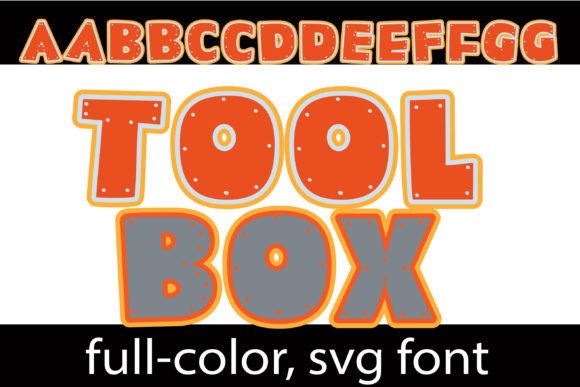
When your design needs to grab attention and hold it, the typeface you choose is your first and most critical tool. Enter Toolbox, a full-color font that doesn't just sit on the page—it builds a presence. This isn't your average display font. With its blocky, geometric forms in striking orange and grey, accented with small, metallic "bolt" details, Toolbox delivers an immediate sense of industrial strength, technical precision, and hands-on creativity. It’s a premium font built for projects that demand a bold, textured personality.
More Than a Typeface: Understanding Toolbox's Unique Character
At its core, Toolbox is an OpenType full-color (SVG) font. This modern typography technology allows the font to embed multiple colors and intricate details directly into the font file. The result is a creative font with a built-in color palette and texture that would be impossible to achieve with standard single-color typefaces. The orange and grey combination evokes construction sites, tool sheds, and rugged reliability, while the subtle bolt accents add a layer of authentic, tactile detail that elevates it from simple text to a design feature.
Beyond its primary color scheme, Toolbox includes an alternate case with additional colors. You can access these variations through your system’s character map or, more conveniently, through the glyph map in design software like Silhouette Studio. This flexibility allows you to adapt the font’s mood to different brand palettes or project themes while maintaining its core industrial aesthetic. It’s important to remember that as a color font, Toolbox will render as a solid black silhouette in programs that don’t support SVG fonts. However, in compatible environments like Adobe Illustrator, Photoshop, Inkscape, QuarkXPress, and Silhouette Studio, its full-color glory comes to life.
Where Toolbox Truly Shines: Applications and Project Ideas
The best display fonts have a clear superpower. Toolbox’s is making an undeniable statement. Its bold, blocky structure ensures high visibility, making it ideal for any context where you need to be seen and remembered instantly.
- Branding & Logo Design: Toolbox is a powerful candidate for logo design for businesses in construction, engineering, DIY, tech startups, gaming, or any brand that wants to project strength and innovation. A logo set in Toolbox immediately communicates a hands-on, no-nonsense ethos.
- Marketing & Advertising: Use it for headlines on posters, flyers, and digital ads. Its visual weight commands attention in crowded spaces, making it perfect for event promotions, product launches, or social media banners where scroll-stopping power is essential.
- Packaging & Product Design: Imagine Toolbox on packaging for tools, hardware, craft kits, or even bold food products like energy bars. It adds a layer of rugged authenticity that aligns with the product’s physicality.
- Digital & Social Media: For YouTube thumbnails, podcast covers, or Instagram graphics, Toolbox provides an instant visual hook. It works exceptionally well for titles and short, impactful text overlays that need to be legible at a glance.
- Editorial & Publishing: While not for body text, Toolbox can create dynamic chapter titles, magazine covers, or book covers in genres like thriller, sci-fi, or technical manuals. It pairs surprisingly well with clean sans serif fonts or even elegant serif fonts for contrast.
Practical Guidance for Using Toolbox in Your Workflow
Adopting a bold commercial font like Toolbox requires some strategic thinking to ensure it enhances rather than overwhelms your project. Here’s how to integrate it effectively.
Evaluating Fit and Readability: First, assess your project’s needs. Toolbox is a display font, meaning it’s crafted for large-scale use like titles, headers, and logos. It is not designed for long paragraphs of body text. Its strength lies in impact, not prolonged reading. Always test it at the intended size to ensure the bolt details remain clear and don’t become visual noise at smaller scales.
Mastering Font Pairing: The key to using Toolbox successfully is contrast. Pair it with a neutral, highly legible sans serif font like Helvetica, Open Sans, or Roboto for body copy. This creates a clear visual hierarchy: Toolbox for the headline punch, and the sans serif for readable information. For a more sophisticated twist, try pairing it with a classic serif font like Garamond or Times New Roman to juxtapose industrial grit with traditional elegance.
Leveraging Alternate Styles: Don’t forget the alternate color case. Use it to highlight specific words within a headline, create a multi-color logo, or adapt the font to a client’s brand colors. This feature transforms Toolbox from a static asset into a versatile component of your design assets toolkit.
Installation and Compatibility: Installing Toolbox is straightforward. On a Mac, use FontBook; on Windows, use the Control Panel or a third-party font manager. Once installed, it will appear in your font menu. Remember, you’ll only see its colors in programs that support SVG fonts. If it appears black in a preview, type out a test word to confirm compatibility. This step is crucial for avoiding surprises in your design process.
Ultimately, Toolbox is more than just a creative font; it’s a strategic design tool. It’s for the designer, marketer, or entrepreneur who understands that typography is about emotion and association. By choosing Toolbox, you’re not just selecting letters—you’re building an identity that feels constructed, reliable, and ready for action. Use it where it matters most: to make your first impression your strongest one.